

Your business platform,
in your own hands
CRM, staff, invoicing and communication on your own infrastructure. In-house development, German servers, no dependence on hyperscalers.
Platform overview · As of 16/11/2026 · Next with →, overview with O, full screen with F
What you will see on the following slides
What RIVUS360 is
One platform for the whole company — and what that means.
The modules
47 modules in 8 areas, each available individually.
Insights
Screenshots from the live platform.
Included in every module
What is not booked, because it is the platform.
Everything from a single source
Website, shop and individual modules on the same core.
Operations and infrastructure
How it runs, and who gets up at night.
Security and data sovereignty
Separation in the database, evidence, exit.
Who it is for, and what else
Four routes to the same platform — and custom builds.
RIVUS360 Academy
Courses, exams, certificates — and mandatory training for your team.

One platform for the whole company
Contacts, invoices, projects, staff, inventory, mail, chat, documents — in one system, behind one login, on one invoice. Not seven tools that someone has to connect.
You choose the modules.
Everything else is our job.
You choose which of the 47 modules you start with, and you can change that at any time. Everything else — servers, updates, backups, certificates, monitoring — is our job. That is not a restriction, but exactly what you are buying.
Modular
Every module can be booked and cancelled per company. The booking takes effect immediately — no appointment, no migration, no waiting.
Operations included
German data centres, our own machines, no hyperscaler. There is no server for you to log in to.
Separated by design
Row-level security in the database, not a filter in the program code. A bug in the code cannot reveal anyone else's data.
Three logins, three invoices, three contacts
In most companies, the website runs with one provider, the shop with a second and the ticket system with a third. The data sits in three places.
How it usually is
- Every tool with its own login, its own invoice, its own contact person
- The same customer sits in four systems — maintained four times, four times differently
- Overnight synchronisations that can fail, and nobody notices straight away
- When something breaks, the first question is who is even responsible
With RIVUS360
- One login, one invoice, one contact person
- The same record everywhere — and therefore correct everywhere at the same time
- No synchronisation that can fail, because there is nothing to synchronise
- Operation, updates and further development from a single source
What is in the catalogue today
Counted, not claimed — the figures come from the same catalogue as the sales page.
All services belong to us
Maps, addresses, routes, remote support, image processing — all on our own machines in Germany. Nobody can raise a price on us, change a condition or switch off a service.
What you get out of it
Every one of these services runs on our own machines. That is not a technical detail — it determines what you pay and who can switch something off on you.
- No invoices for map services Address checks, map requests and route calculations are not counted. A form that validates every address costs as much as one that validates none.
- No third party in the way A service we operate ourselves cannot be discontinued, restricted or repriced by anyone. Terms we have not signed cannot change.
- Resilience in our own hands The machines are ours, so a replacement is a decision and not a support ticket with a provider that owes you nothing.
- Server capacity for your own software If you need machines for something of your own, you can rent them here — alongside the platform, in the same private network, looked after by the same people.
Parts of the open source behind it
⚠️ The platform itself is our own development — it is not open. What is open is what runs UNDERNEATH it: the services it builds on. Whatever we do not develop ourselves, we use exclusively as open source, and we operate every piece of it on our own machines.
OpenStreetMap
Maps, boundaries, areas
Overpass API
Queries on the map data

Pelias
Addresses with our data
Valhalla
Routes and travel times
VROOM
Route planning
rembg
Cutting out images
Real-ESRGAN
Upscaling images

RustDesk
Remote support
What we do not do ourselves, we integrate
We operate the phone system ourselves. The line behind it, we do not — anyone who makes calls has a contract with a provider, and we integrate that. The telephony contract is with the provider, the platform contract with us.

Placetel
Cloud telephony from Germany. Phone numbers, direct dial numbers and the line come from Placetel — the phone system with queues and the call note on the contact comes from us.
Advertisement · We earn from a contract concluded via our referral. The price stays the same for you.

easybell
Classic SIP line from Germany. Connected to the platform via the RIVUS WebRTC gateway — just like sipgate, NFON or Telekom.
18 providers can be connected today
From Aircall to sipgate, plus your own in-house phone system. If you already have a provider, you keep it. Further partnerships will follow.

47 modules in 8 areas
The platform is not bought in one piece. Every module can be booked and cancelled individually per company; your selection only determines what the platform starts with. Organised by who needs it — not by how we built it.
Eight areas, organised by need
Customers and sales
Contacts, quotes, contracts, invoices.
9 modules
Staff
From hiring to the reference letter.
1 module
Work
Projects, tasks, appointments, notes.
7 modules
Communication
Mail, telephony, messaging, public presence.
8 modules
Goods and production
From the item master to the till — everything that moves material.
8 modules
Properties and assets
Real estate, vehicles, equipment — an inventory with a history.
3 modules
Recruiting
Candidate search, evaluation, hiring.
3 modules
Integrations
Connect existing systems instead of replacing them.
8 modules
Customers and sales
Contacts, quotes, contracts, invoices.
Contacts and CRM
All contacts in one place, with history, responsibilities and a completeness check.
Contact search
Full-text search across all contacts and documents — including partial words and typos.
Address validation with maps
Checks addresses as you type, completes missing details and shows them on the map.
Contact completeness
Defines which fields count and shows on every record what is missing.
Invoicing and dunning
Invoices, credit notes, dunning, number ranges, layouts — with net and gross calculation, as a handover to your accounting.
Subscription management
Bill recurring services: terms, price adjustments, country-specific prices.
Map creation
Draw your own territory maps — sales territories, catchment areas, site planning.
Time tracking
Record, analyse and bill working time and project time.
Contracts
From template to signed contract with a click.

Staff
From hiring to the reference letter.
Staff management
Master data, contracts, qualifications, training, surveys, organisation chart, onboarding and offboarding.
Included, at no extra cost and without a second module:
Training
Courses made up of modules and lessons, with questions at the end and dates for whatever has to take place in person.
Contracts
Employment contracts, supplementary agreements and policies as documents with versions, assigned to the person.
Requests
Annual leave, working from home, business trips, equipment — the organisation decides which types exist.
Travel expenses
A trip with legs, days, kilometres and receipts.
Surveys
Your own questionnaires sent to selected people, with invitation and reminder.
Staff development
Staff appraisals, goals with measurable results and review rounds in which colleagues are asked too.
Organisation chart
The structure of the organisation, drawn from the master data.
On-/offboarding
One process per joiner and leaver: items with owners and dates.
Working hours & public holidays
Working-time models per person and a public holiday calendar by country and federal state.
Skills
What someone can do and what the role requires — target and actual side by side.
Work
Projects, tasks, appointments, notes.
Tasks
Tasks with statuses, categories and ownership — recurring ones too.
Projects
Projects with tasks, documents, times and reporting.
Calendar
Appointments, resources and synchronisation with existing calendars.
Reminders
Follow-ups on contacts, projects and contracts.
Notes
Notes with synchronisation — including from Apple Notes.
Document editing
Edit documents, spreadsheets and presentations together in the browser.
Rewards and competitions
Set goals, make progress visible, reward success.
Communication
Mail, telephony, messaging, public presence.
Webmail
Your own mailboxes with webmail, spam and virus filtering — on your server.
Email signatures
Consistent signatures for everyone, managed centrally.
Teams and chat
Internal messages in channels and direct — in real time.
Telephony
Phone system with call notes directly on the contact.
Notifications
Alerts in the browser, by email and as push notifications.
Social media
Plan and publish posts across several channels.
Websites
Maintain your own pages — multilingual, in your company's style.
Remote support
Take over screens via your own server — not via a third-party relay.
Goods and production
From the item master to the till — everything that moves material.
Items and master data
The foundation: one item, one number, one truth.
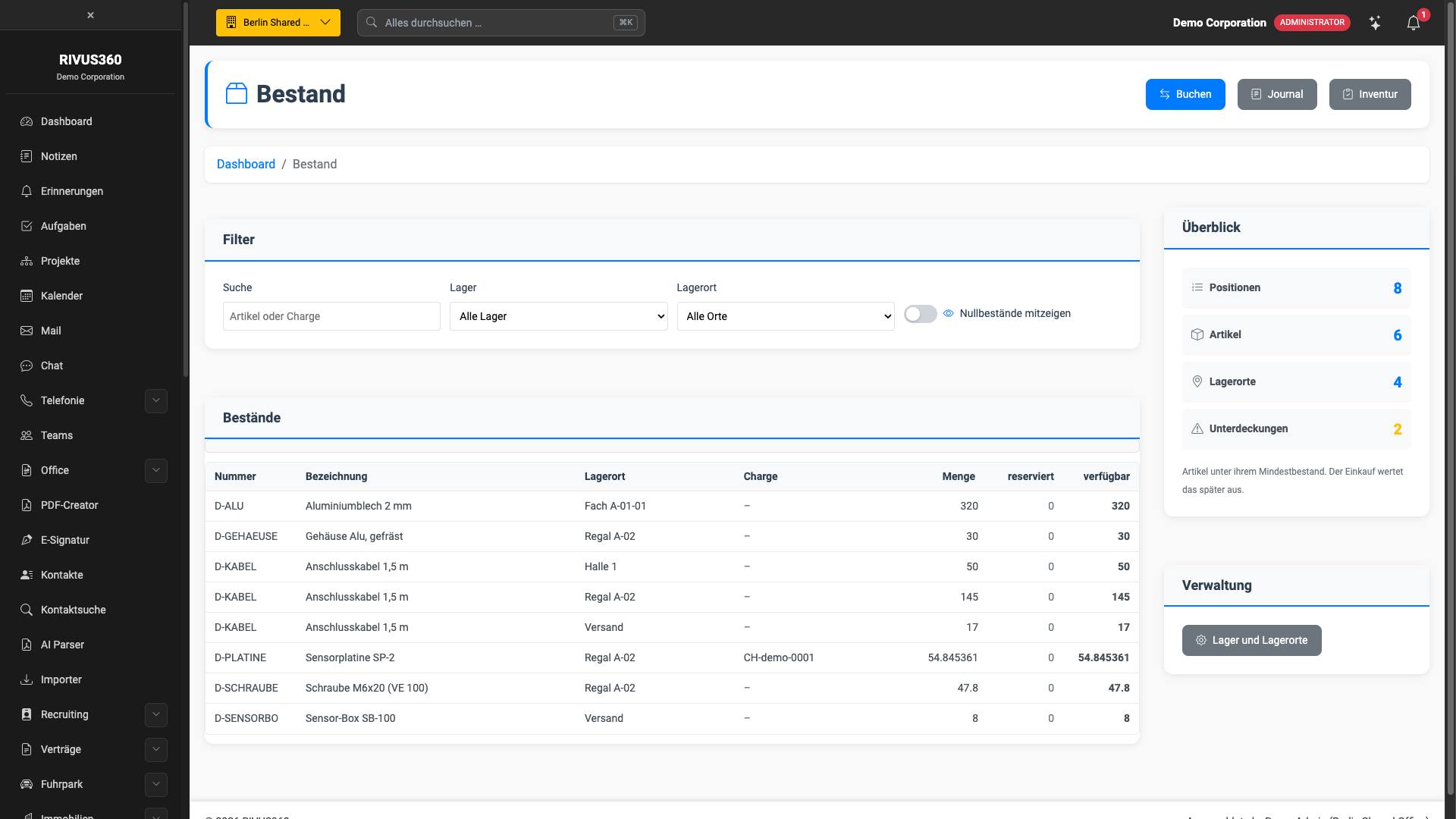
Inventory and stock
Every posting has a source and a destination — receipts and issues included.
Purchasing
A closed chain from the purchase requisition to the stock posting.
Production
Bill of materials, production order, confirmation.
PLM — change management
Change requests, change orders and revisions with a history that cannot be rewritten.
Maintenance and servicing
Equipment with a history: what was serviced, by whom, with which parts.
Quality
Inspection points, inspection lots and quality notifications — with evidence that stands up to an auditor.
Point of sale
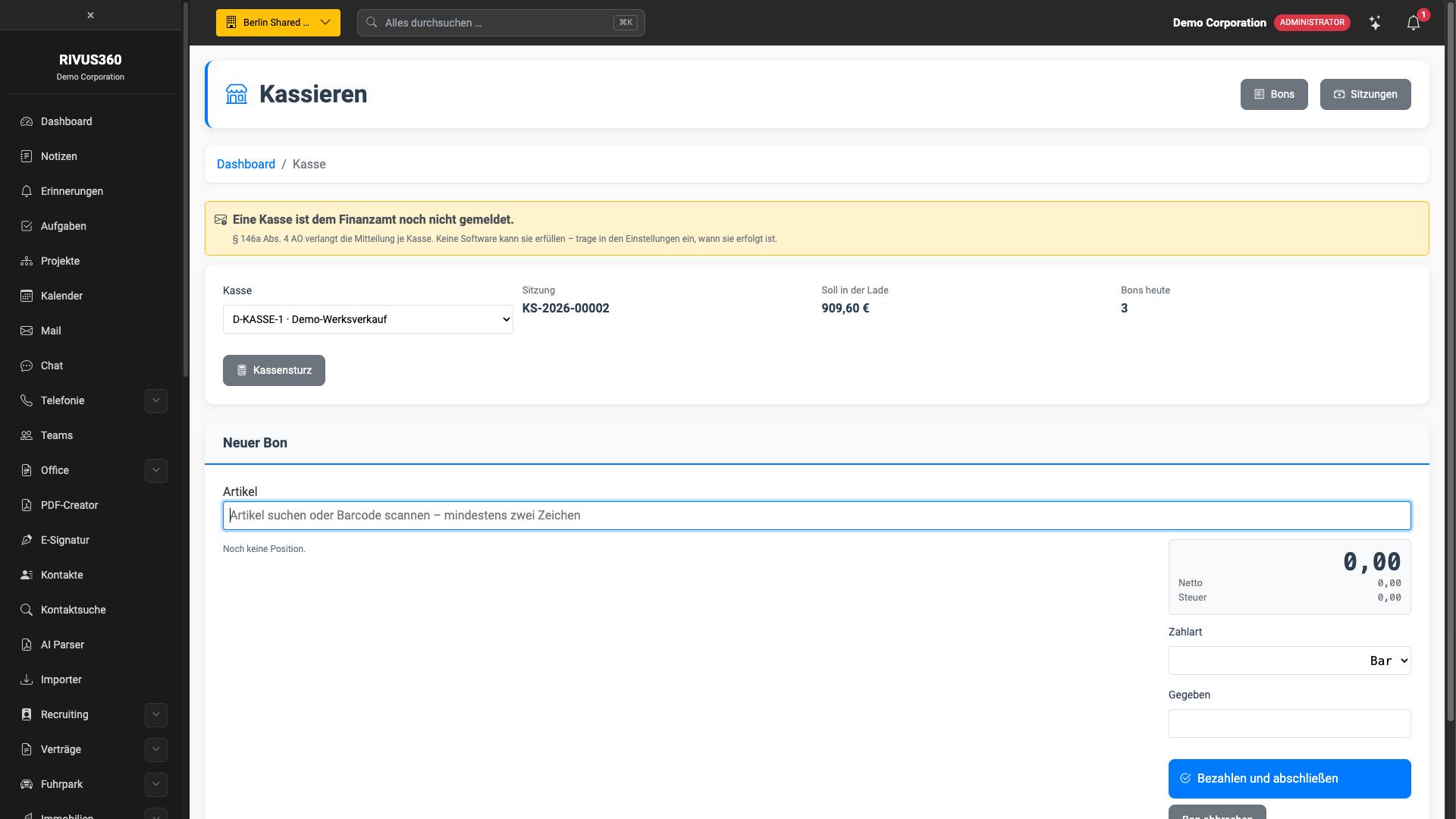
Till session with the expected amount in the drawer, items added to the receipt by search or barcode, cash-up in the evening.

Properties and assets
Real estate, vehicles, equipment — an inventory with a history.
Real estate
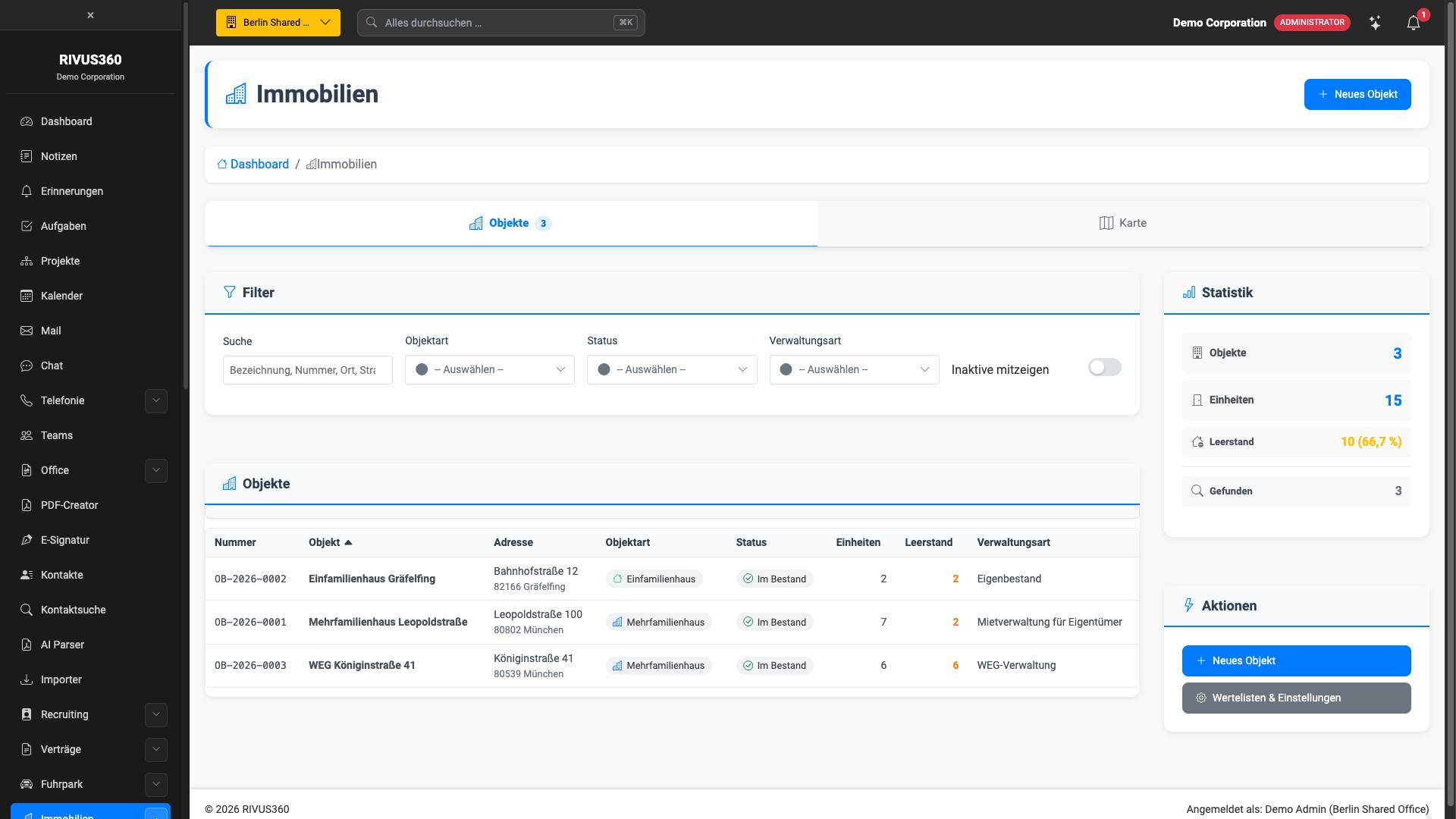
From a single-family home to a full portfolio: properties, units, tenants, leases, service charges.
Fleet
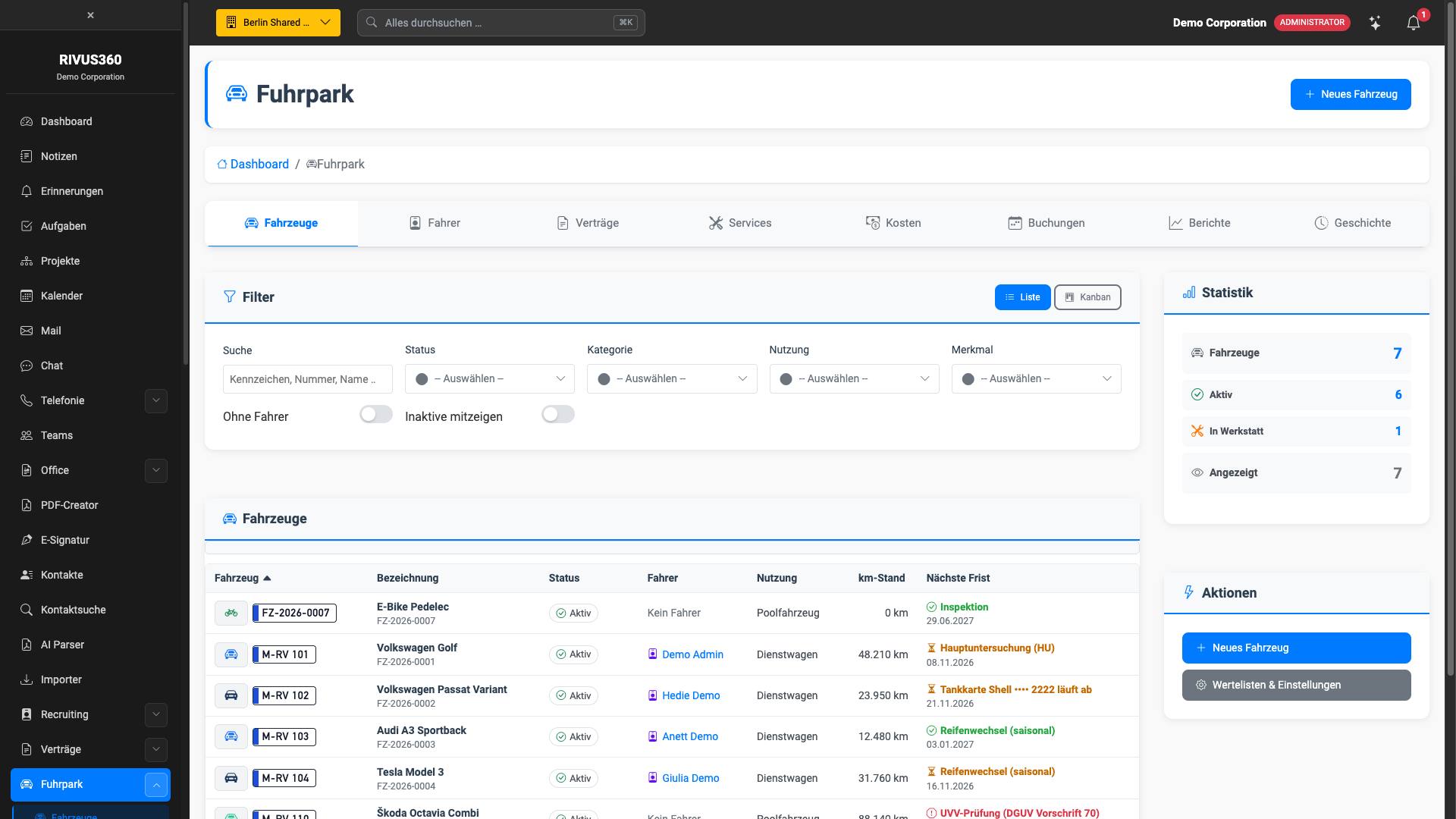
The entire vehicle fleet in one place: keepers, deadlines, costs, damage.
ESG and sustainability
What customers, banks and audits demand — EcoVadis, VSME, supplier audits — in one place instead of five spreadsheets.
Included, at no extra cost and without a second module:
Deadlines
General inspection, safety briefing, service, driving licence check — due by date or by mileage.
Report a concern
A whistleblowing system in which anonymous really means anonymous: for an anonymous report …
Suppliers
One record per supplier: risk, code of conduct, contract clause, assessments and the measures that follow from them.
Key figures
The platform calculates the key figures from its own data — workforce, vehicles, energy.
Targets & measures
One target per year, and beneath it the measures intended to achieve it.
Commute
The commute to work is an item in every greenhouse gas inventory and in no database.
Recruiting
Candidate search, evaluation, hiring.
Applicant management
Vacancies, applicants, selection processes and evaluation in one place.
AI CV analysis
Reads CVs and creates applicants with their qualifications.
Profile import
Import profiles from the browser. Free of charge.
Included, at no extra cost and without a second module:
Projects
A vacancy to be filled is a project: with areas of deployment, required skills and the contacts attached to it.
Candidate search
Search within your own talent pool: by skills, location and availability.
Evaluations
Whether an assignment is worthwhile is assessed against fixed criteria rather than gut feeling: margin, …
Skills
A maintained catalogue of skills in categories, instead of free text in every CV.
Integrations
Connect existing systems instead of replacing them.
AI translation
Translate content into all maintained languages at the push of a button.
In-app AI assistance
Explains every page and every step — and knows the modules you have booked. Free of charge.
Nextcloud
Integrate files, calendars and contacts from your Nextcloud.
ownCloud
Integrate ownCloud.
OpenCloud
Integrate OpenCloud.
Seafile
Integrate Seafile.
Synology DSM
Integrate Synology DSM.
WebDAV, CalDAV, CardDAV
Integrate any server via the open standards.


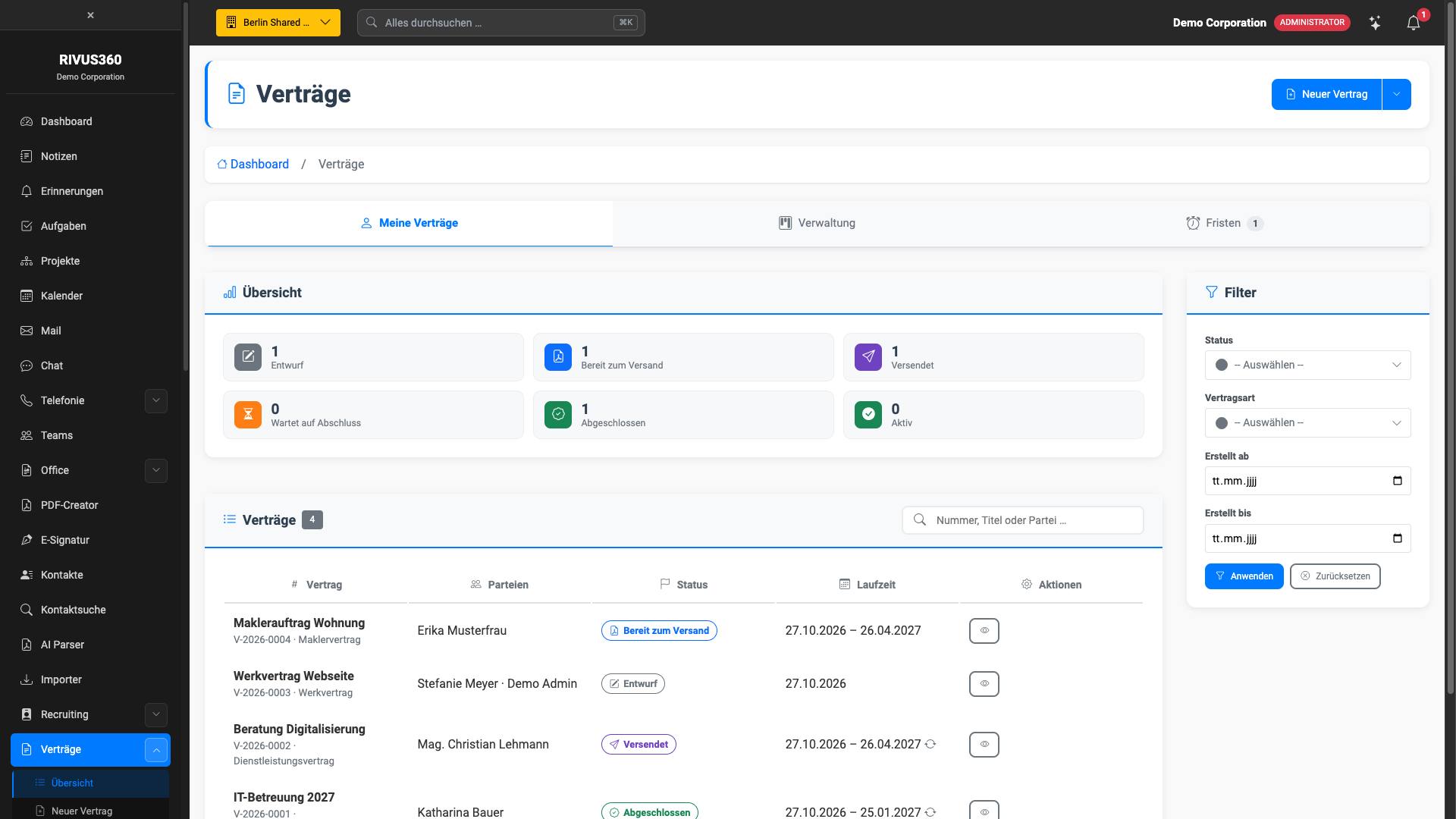
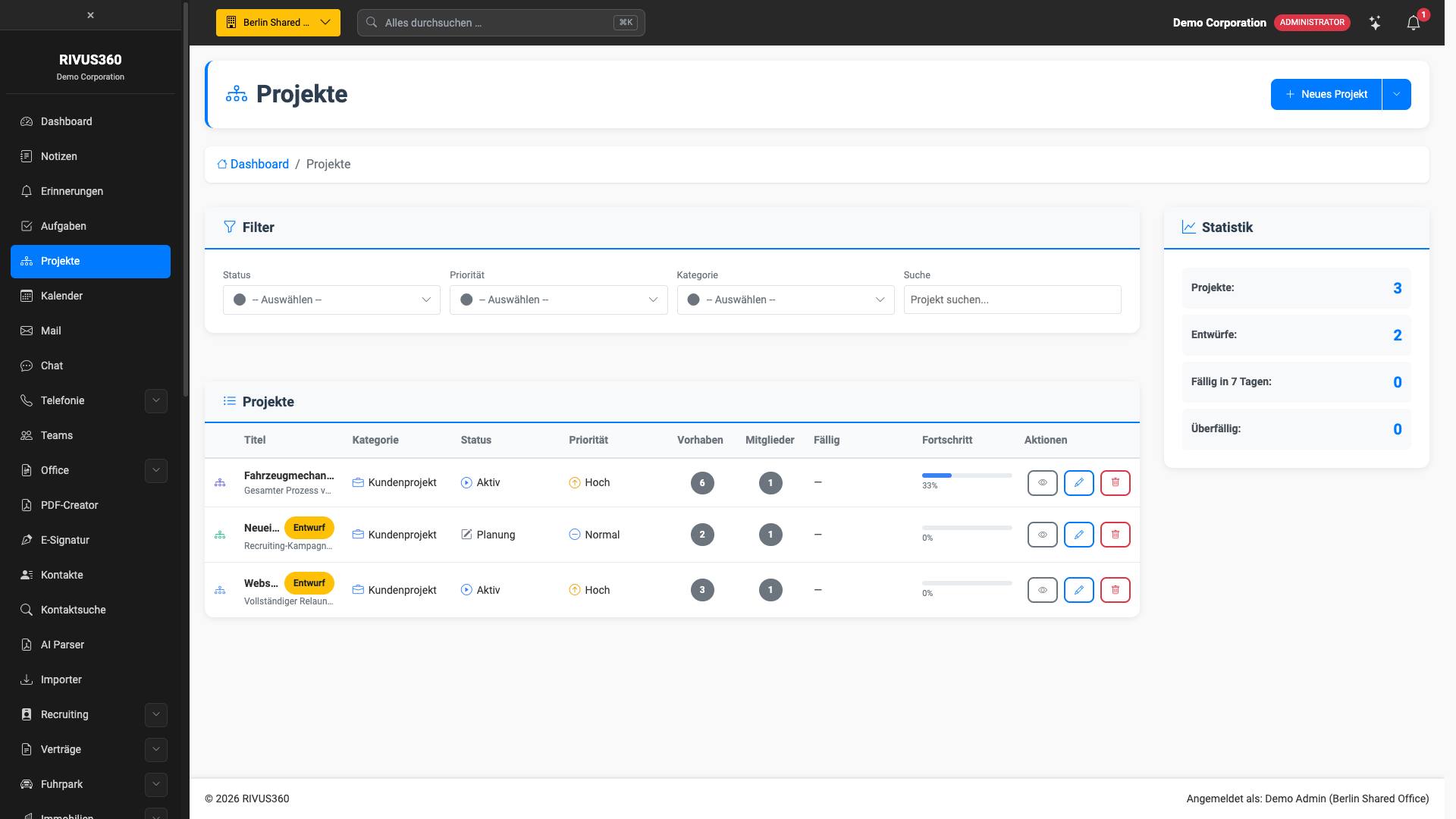
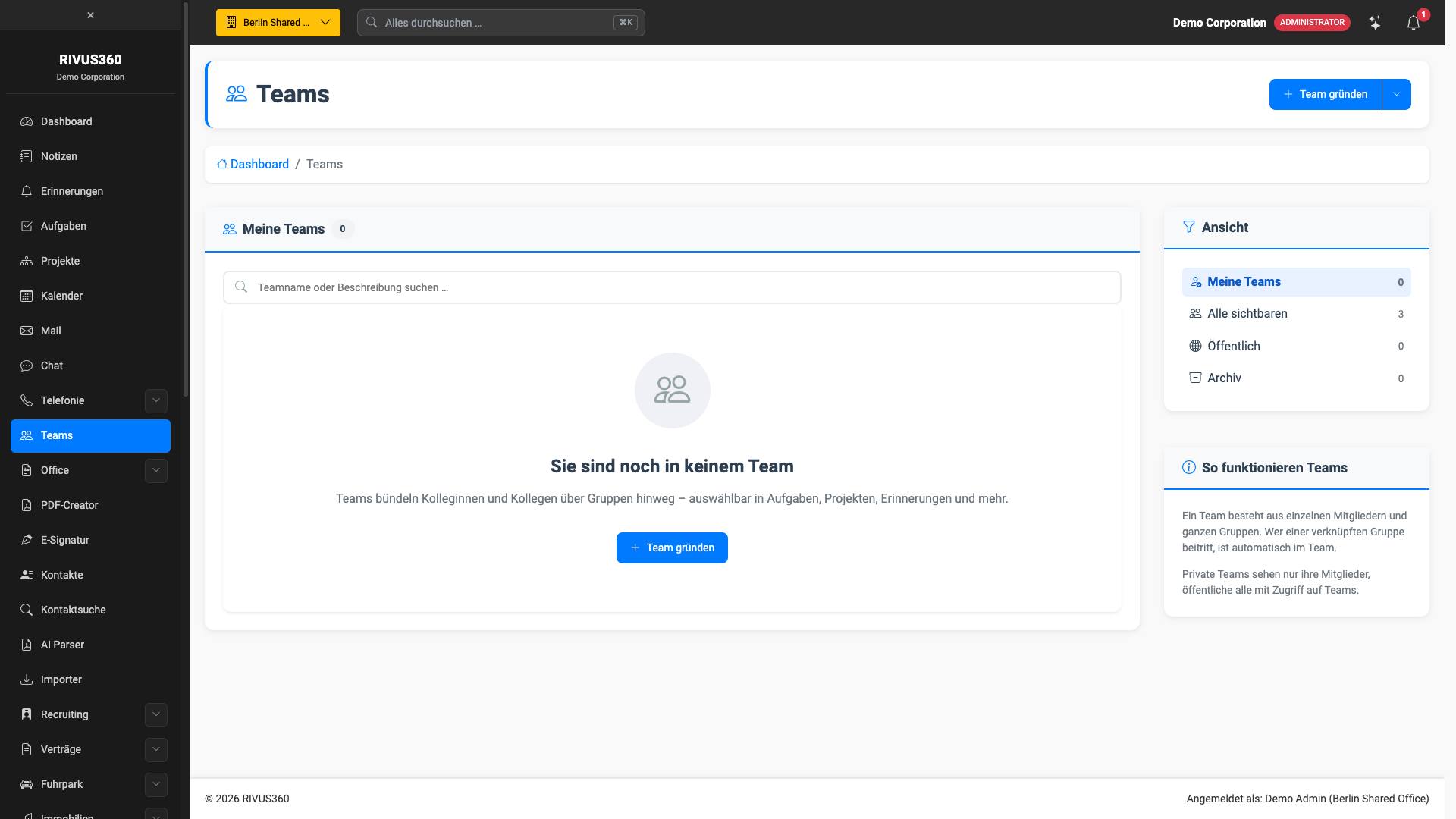
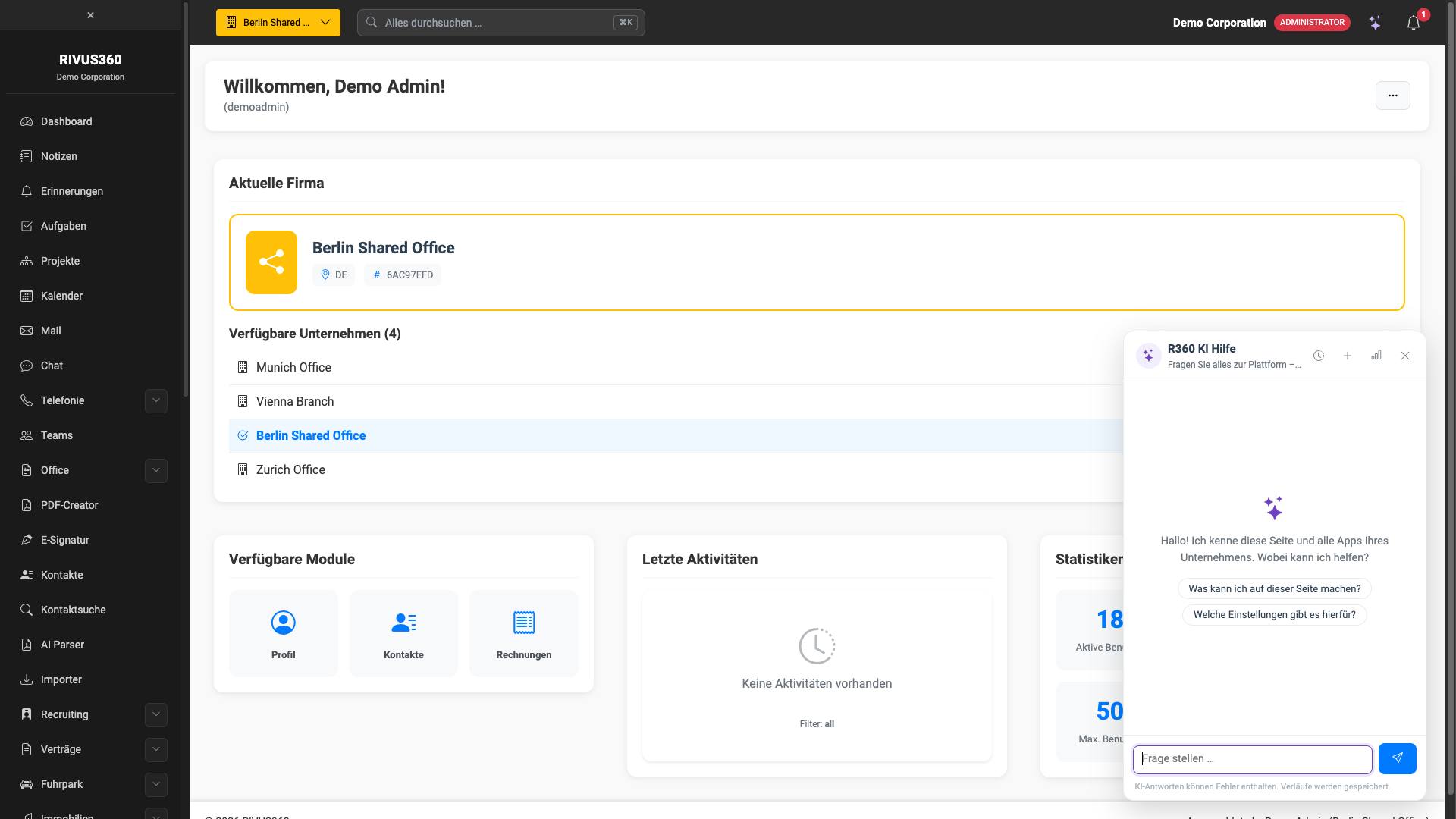
This is what it looks like
The following images are screenshots from the live platform — not mock-ups and not illustrations. What you see on them exists today.
Contacts and CRM · Invoicing and dunning
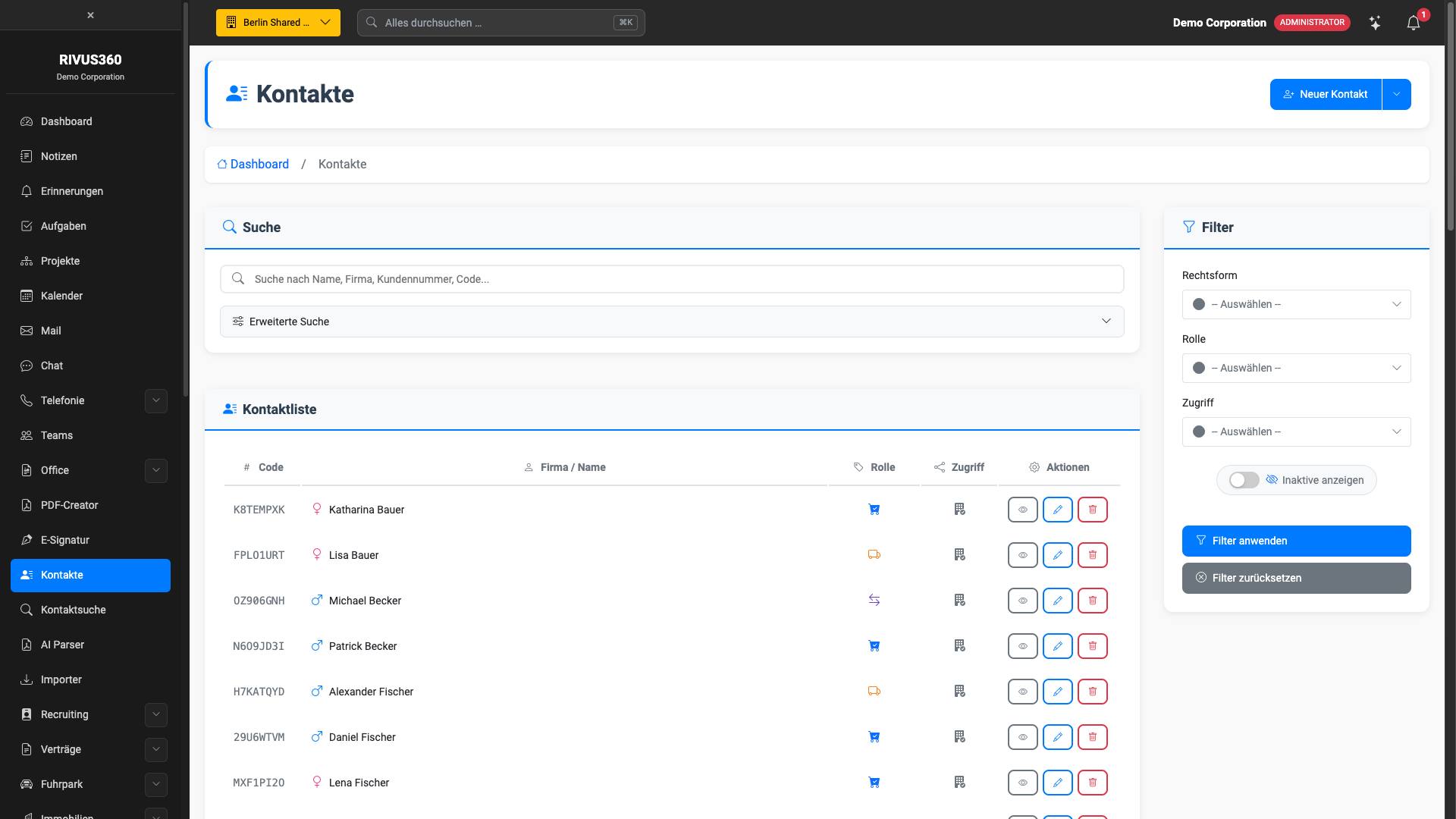
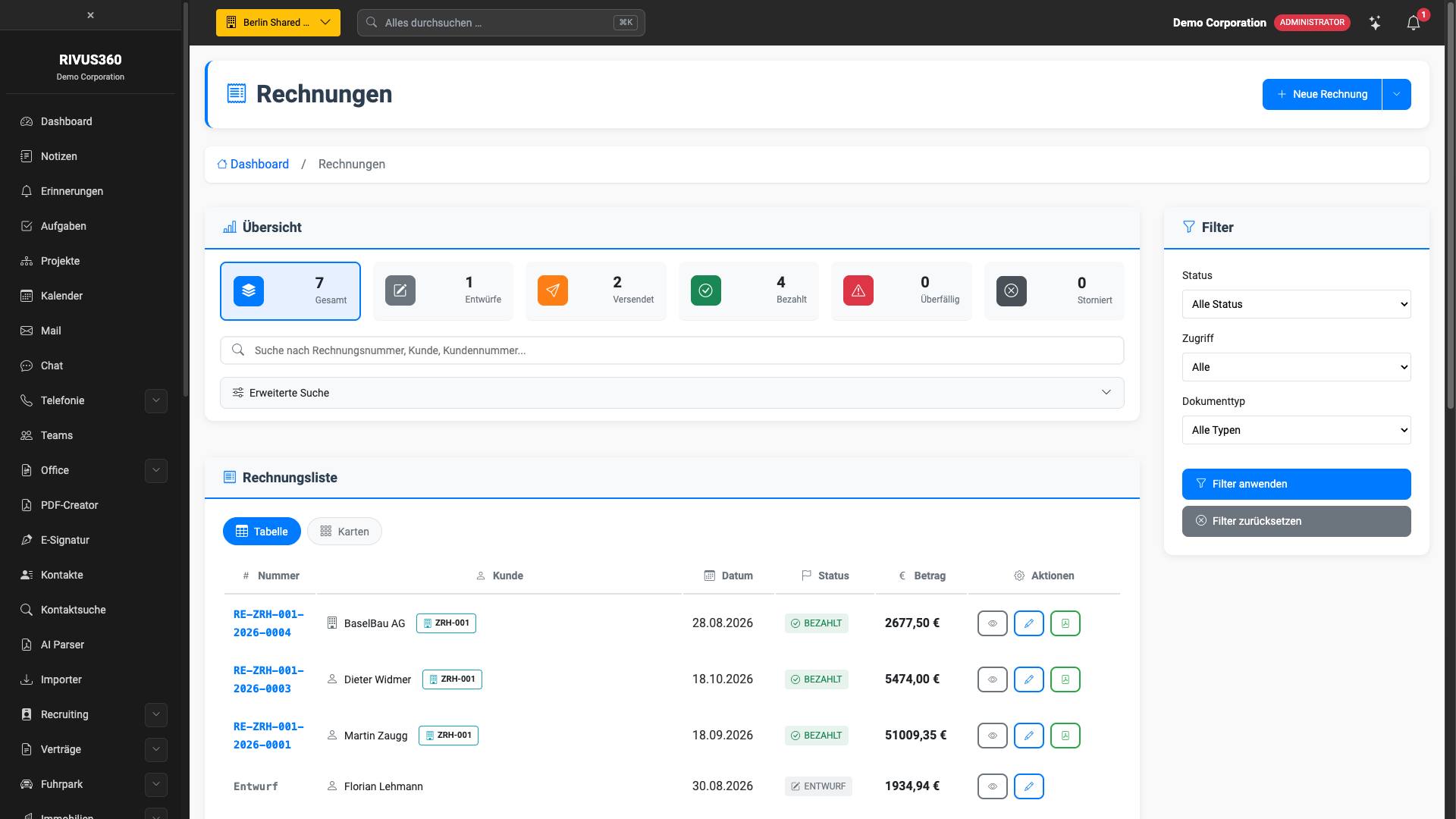
Contracts · Projects
Tasks · Calendar
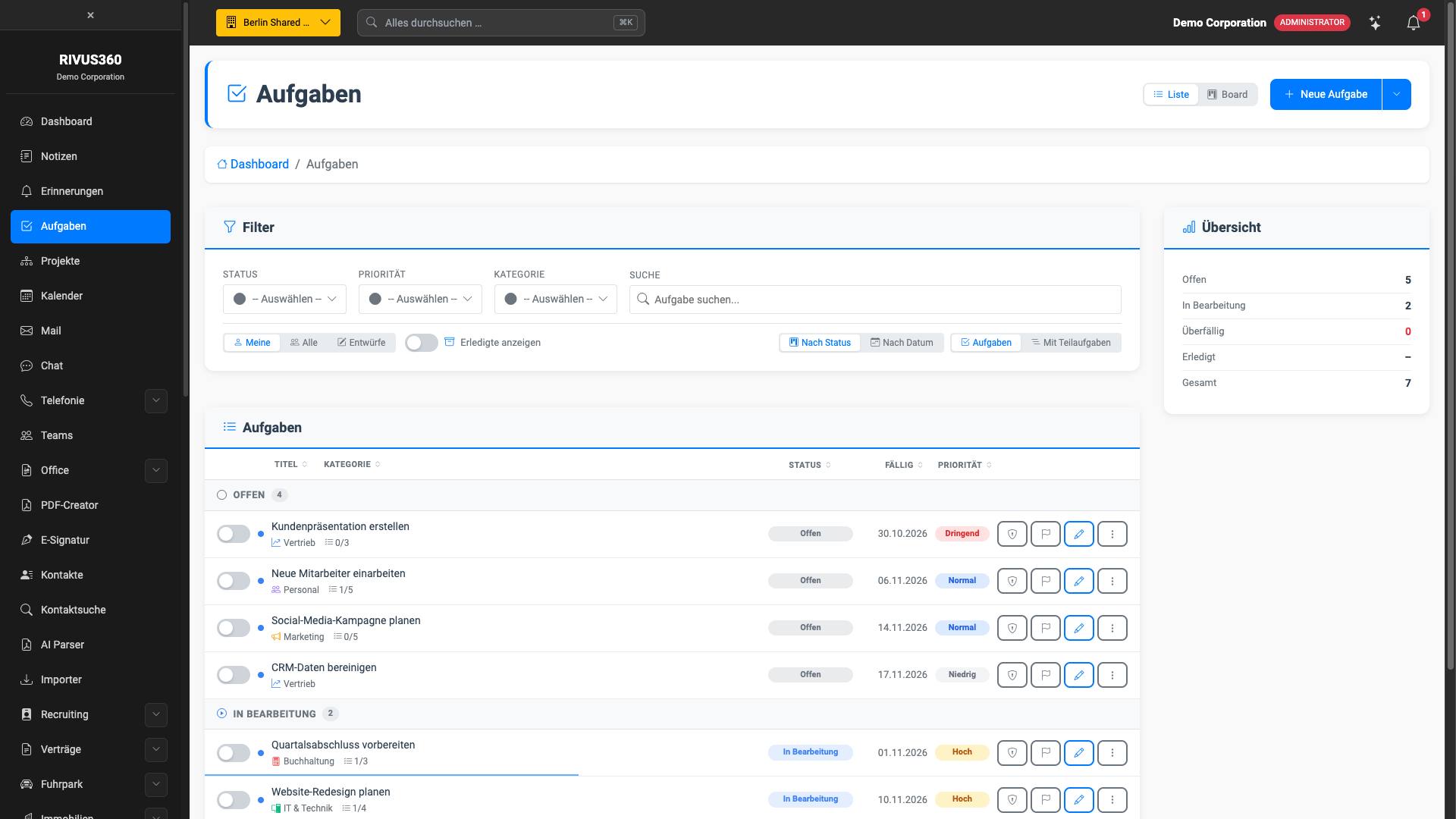
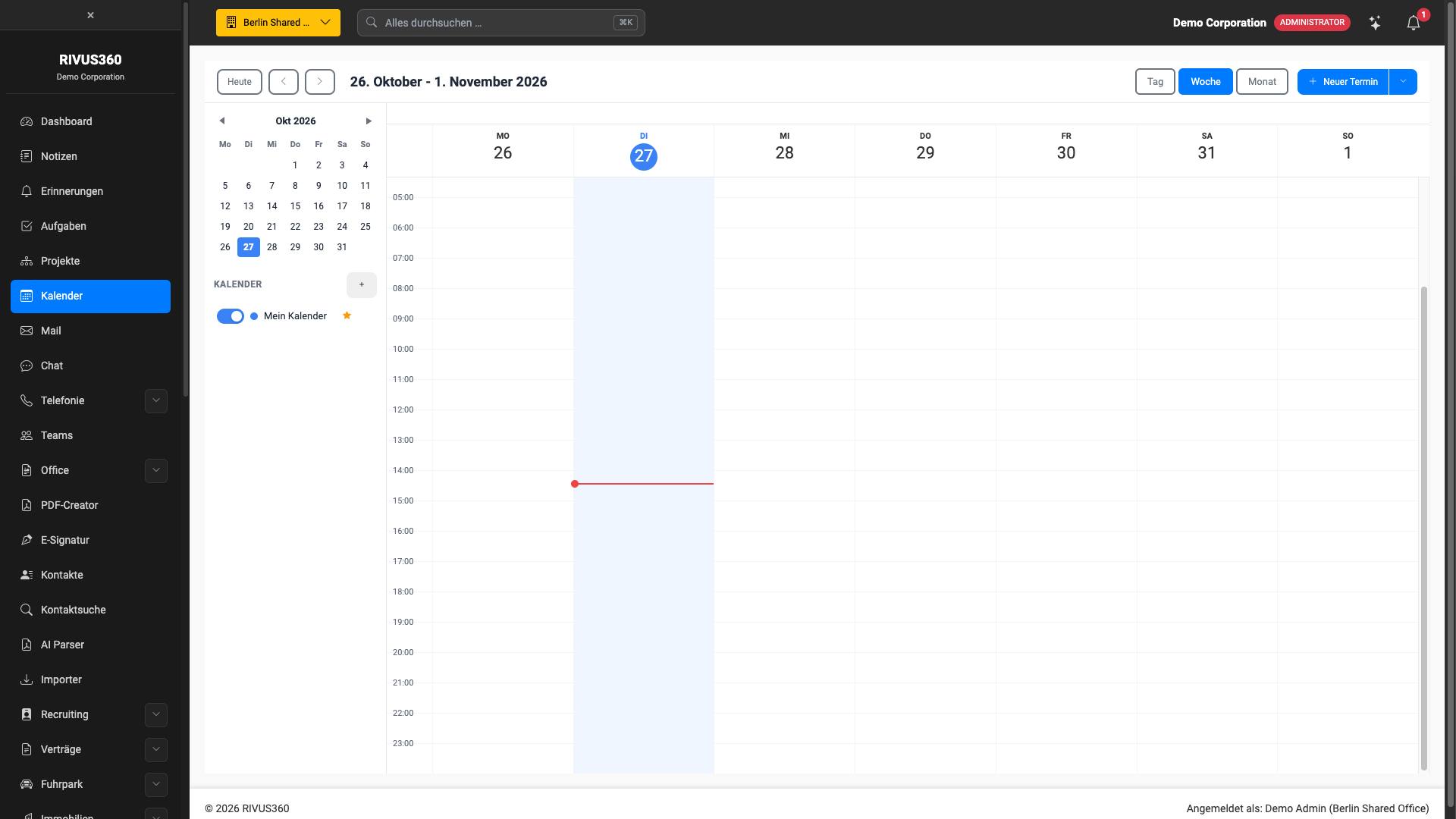
Staff management · Applicant management
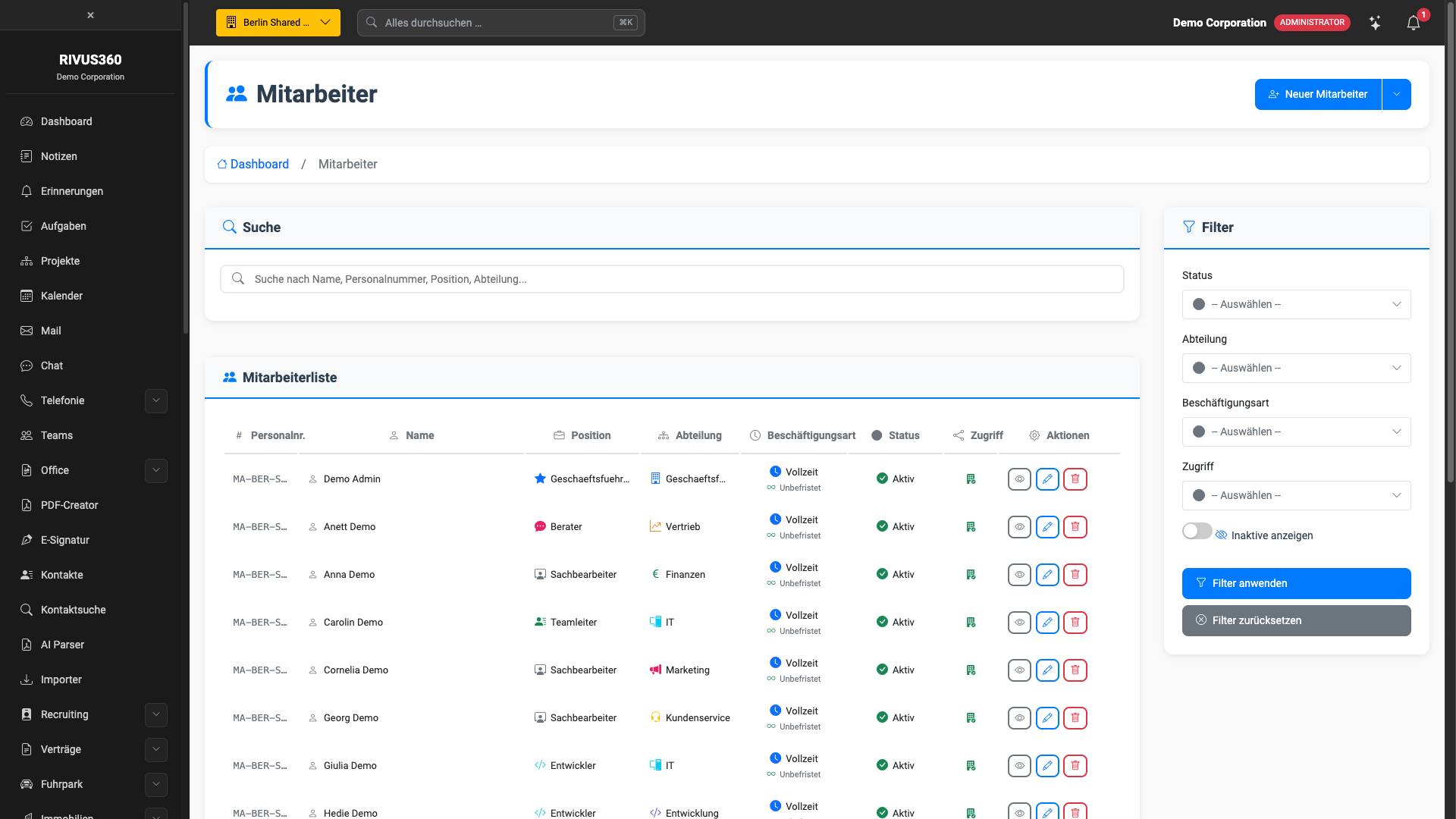
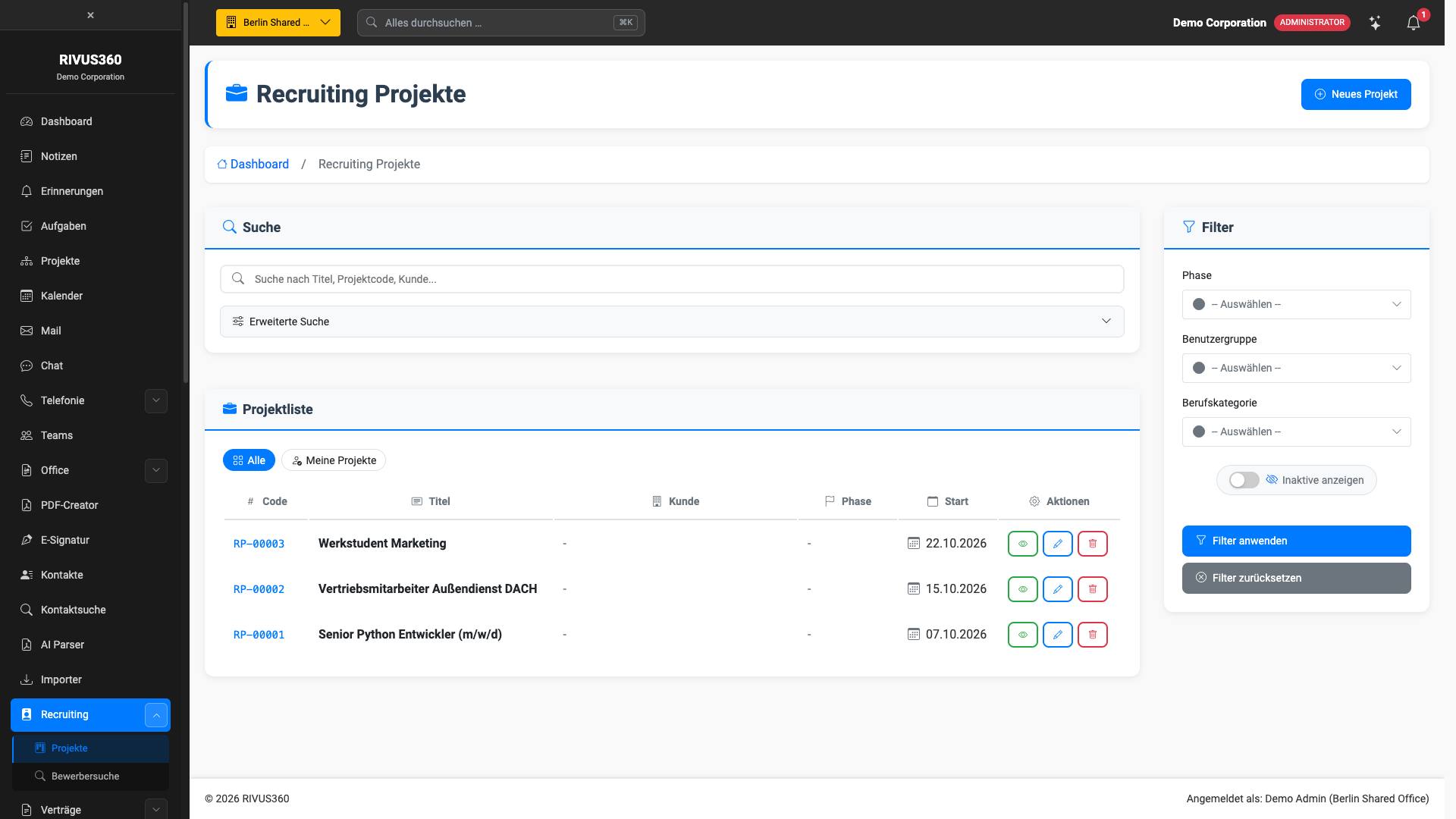
Inventory and stock · Point of sale
Real estate · Fleet
Teams and chat · In-app AI assistance

What you do not book,
because it is the platform
Permissions, logs, search, notifications, languages, dark mode, interfaces — the core is always there. And the records are linked, rather than sitting side by side in forms.
What you do not book, because it is the platform
These are not add-ons, and none of them is charged per module. This is how the platform is built — so it applies to the one module you start with just as much as to all of them.
One login for everything
Every module booked sits behind the same login — and on the same invoice. Nothing needs to be connected.
Roles and permissions
You define per role who may see and change what. Tenant separation lives in the database, not in a filter in the program code.
Two-factor authentication
With backup codes, account lockout after five failed attempts and automatic sign-out after one hour of inactivity.
A complete audit trail
Who did what, when and from where — immutable, separated per tenant and exportable. In every module, not just the sensitive ones.
Interfaces
API keys with limited scope and their own rate limits, versioned endpoints, signed webhooks.
An AI can use it
The platform speaks MCP. A connected assistant is checked against the same permissions as the person using it — it can never do more.
Backups and operations
Updates, certificates, monitoring and daily encrypted backups are our job. There is nothing for you to maintain.
Your data remains yours
Documented schema, complete export. Leaving is a button, not a negotiation.
A record, not a form
In most systems, a customer is a row with a phone number. Here a customer is a record, and everything that happens with them is attached to it — without anyone having to file it there.
A customer record
Master data, addresses with coordinates, email addresses, phone numbers, bank details, tax details, relationships with other people and companies.
And alongside, as separate tabs:
Appointments · Reminders · Communication · Notes · Files · Websites · Recruiting · History
A project
Work packages that depend on one another, each with its own sub-steps — one example here carries six work packages and fourteen elements beneath them.
And attached to the same project:
Participants, staff and customers · Tasks from every work package · Comments · Attachments · Links to recruiting projects · Links to any records · History
A task
Subtasks with their own progress, priority, category, due date — and the project it comes from.
Created directly from the task:
An appointment in the calendar · A reminder that must be accepted · Comments · Links · History
Let AI operate RIVUS360
The platform speaks MCP — the protocol through which AI assistants reach real systems. Once connected, an assistant can look things up, create a task, read a project or enter an appointment.
- With your permissions, never more. A connected assistant is checked against the same permissions as the person using it.
- AI tools are already built in. Translate content, analyse CVs, explain the page you are currently on.
- Your own key. You store your API key once, from the provider you are paying anyway. It is kept encrypted in your platform and never belongs to us.
One system, not hundreds
Websites, shops and individual modules on our own core, connected to the platform via an interface on the private network. One login, one invoice, one contact person.
What that means in practice
Websites
Your public website runs on our Site-Core. Chat, newsletter and the contact form are not extensions but parts of it. A contact request does not land in a mailbox from which someone has to copy it out, but as a lead in the platform — with source and history.
Chat · Newsletter · Contact requests · Content, multilingual
Shops
Selling, renting, booking appointments or offering a single service — these are four different processes, and they are built as such. An order becomes a customer, an invoice and, if you wish, a contract, without anyone retyping anything.
Online shop · Services on request · Rentals · Appointments and booking
Individual modules
Some things are intended for people who are not part of your workforce: a customer signing a PDF, a supplier reporting a fault, a technician who needs remote support. They get exactly that one page — and no account in your main system.
PDF signing · Ticket support · Remote support · Customer login
Why this is usually less effort
The modules already exist
An agency writes a shop for every client. We have one and set it up. What remains to be built is what makes your case different, and that is a fraction of the whole.
No limits imposed by plug-ins
A system made of plug-ins can only do what its plug-ins can do. If a requirement does not fit, the answer is “not possible”. We have the source code, so the answer is a price and a date.
One contact person for everything
Operations, updates and further development come from the same place as the build. Nobody has to find out who is responsible before something gets fixed.
Servers you never have to think about
Updates, certificates, backups, monitoring, a failed disk at three in the morning — none of it reaches you.
What we take care of
Nobody calls you at night
Updates, certificates, backups and monitoring are our job. There is no server for you to log in to — because there is nothing there for you to do.
A machine is allowed to fail
Everything runs in multiples. A failed node is replaced while work continues — that is built in, not hoped for.
German data centres, our own machines
Nuremberg and Falkenstein, our own hardware, a provider under German law. There is no hyperscaler between you and your data.
Three zones, strictly separated
Every server sits in exactly one zone, and every zone has its own firewall. Nothing from the internet reaches the database — not even through a misconfiguration, because the route does not exist.
The only servers reachable from the internet, and only via ports 80 and 443. Administrative access exclusively from our own address.
Application, database and storage. Not a single port is open to the internet. These machines only talk to the private network.
Cluster control, monitoring, backups. Control access is reachable from our address and from the private network — from nowhere else.
Every layer exists three times
A machine can fail without anyone noticing; that follows from the design and is not a promise someone has to keep.
16 services, and none of them bought in
The modules are one half. The other half are the services they need — and those belong to us too, on the same machines, in the same operation.
Mail server
Your own mail server with mailboxes, webmail, spam and virus filtering.
Full-text search
Searches contacts, documents and notes in milliseconds.
Web analytics
Self-hosted statistics without cookies and with anonymised IP addresses — the …
Virus scanning
Scans every uploaded file on arrival.
Monitoring and alerting
Metrics, logs and alerts.
Object storage
Self-hosted file storage with signed, time-limited links.
Cache
Sessions, caching and real-time messaging.
Background processing
Runs longer tasks without anyone having to wait: imports, reports, AI calls, mail dispatch.
Remote support
Your own remote support server.
Document editing (ONLYOFFICE)
Edit documents, spreadsheets and presentations in the browser — together, and without any file leaving the house.
Document editing (Collabora)
The same idea on an open basis, considerably cheaper.
Document editing (Microsoft 365)
You bring your own licences, we connect them.
Phone system
Your own phone system with direct dial numbers, queues and call notes on the contact.
Address service (worldwide)
Checks and completes addresses worldwide — from our own address data with …
Map data and polygons
Your own maps, boundaries and territories — entirely self-hosted.
Route calculation
Travel times, routes and territory planning on our own geodata.
Where your data is stored
In Germany by default. Elsewhere on request — but always knowingly, never by accident, and never spread across a continent you have not chosen.
Germany · recommended
Nuremberg · Falkenstein
This is the default: German law, German data protection supervision and no transfer to a third country.
European Union
Helsinki
Within the EU, under the GDPR. Useful as a second location for cross-border failover.
Outside the EU
United States · Singapore
Possible where you have people on the ground. We tell you clearly what this means for your data protection obligations before you choose it.

Your data remains yours —
and you can check that
Separated in the database, not by a filter in the program code. Fully exportable at any time, in a documented format. And cancellable without a conversation about why.
Your data is kept separate from everyone else's
Separation does not happen in the application, where a forgotten filter would be enough to break it. It happens in the database itself.
A dedicated database schema
Every tenant gets its own schema, plus separate schemas for logs and files.
Row-level security in PostgreSQL
The database refuses rows that belong to another tenant — regardless of what the application asks. A programming error cannot hand out anyone else's data.
Separate storage areas
Files are stored outside the web directory, in a separate area per tenant, accessible only via time-limited signed links.
Identifiers that cannot be guessed
No sequential numbers anywhere. Counting upwards to find someone else's record is not possible.
What is built in
No add-on packages — this is how the platform is built.
Access
Two-factor authentication with backup codes, account lockout after five failed attempts, session rotation on sign-in, automatic sign-out after one hour of inactivity.
Chain of evidence
Who did what, when and from where. Immutable, separated per tenant, exportable — for your own audits as well as ours.
Files
Virus scanning on upload, type and content checked, quarantine for anything suspicious, encryption at rest, signed links with expiry.
In the browser
A strict Content Security Policy: scripts and styles only from our own server. No CDN, no tracker, no third-party code. Nothing loads that we did not write.
Interfaces
API keys with limited scope and their own rate limits, versioned endpoints, signed webhooks. A lost key can be revoked.
Backups
Daily, encrypted, kept separate from the live data — and restored according to plan, because a backup that nobody has ever restored from is not a backup.
Six areas, six answers
For companies with fewer than 50 employees, the BSI has developed a procedure with 27 requirements in six areas: DIN SPEC 27076. This structure works through the essentials in a sensible order.
Organisation and awareness
One contract, one processor, one log. Mandatory training with deadlines and learning progress is a module, not a side agreement.
Identities and permissions
Second factor with backup codes, lockout after five attempts, sign-out after one hour. Visibility per document, not per user group.
Data backup
Daily, encrypted, kept separate from the live data — and restored according to plan.
Patch and change management
Setting up, operating, monitoring, backing up and keeping up to date are part of what you buy. There is no server in your office that someone has to remember.
Protection against malware
Uploaded files are scanned, anything suspicious goes into quarantine. Nothing runs in the browser that does not come from our own server.
IT systems and networks
Our own machines instead of shared cloud instances, Nuremberg and Falkenstein, separate zones and a private network between the services.
What you can check for yourself
Everything mentioned so far happens beneath the surface. You can click through these seven points in a demo.
- Every invoice has a visibility setting. Shared, company-wide or private — set per document, not per user group. Invoices, advanced search
- Private teams are private. A private team is visible only to its members, a public one to everyone with access to Teams. Teams, overview
- The inventory journal is append-only. A correction is a second posting. Nothing is overwritten, which is why every stock level can be traced back. Inventory, journal
- Sustainability figures keep an audit trail. Who entered which value and when — in a dedicated area, right next to the figures. ESG, Audit tab
- Contracts go through an approval. Draft, ready to send, sent, concluded. A contract that has been sent is not a concluded one. Contracts, statuses
- Hours are approved, not posted straight through. Time entries go into an approval step before they end up on an invoice. Time tracking, administration
- Records keep their history. Contacts, projects and contracts each have a tab with the history of what has changed. Every record, History tab
You can switch at any time
The strongest argument for a platform is that it does not need to hold on to you.
Complete export, at any time
All your data in open, documented formats. No application, no notice period, no fee.
Documented schema
The structure of your data is written down. Someone else can continue working with it — that is the point.
Cancel with one click
A cancellation button in your account, not a letter to a postal address. Written confirmation arrives immediately.

Who this is built for
Four routes to the same platform — and, for whatever cannot be a platform, a custom build on your own hardware.
Four routes to the same platform
People who land here come with very different questions. A single entry point for all four ends up serving none of them.

Small businesses
5 to 25 employees
Everything in one place, without an IT department of your own.
We run it, you use it.
- Fixed monthly price
- Set up in days
- The data stays in Germany
Mid-sized companies
25 to 250 employees
You can be prepared for NIS2.
Separate tenants, logs, MFA — as the foundation.
- Permissions down to the individual field
- A complete audit trail
- Three nodes as standard
Corporate groups and the public sector
From 250 employees, regulated environments
No foreign jurisdiction, no lock-in, everything verifiable.
In-house development, documented schema, complete export.
- Your own cluster on request
- Documentation for audits
- Cross-border failover

IT service providers
Resellers and agencies
Our platform, your customer.
Under your name, at your prices.
- Your logo, your domain
- All tenants in one place
- Margin on everything
When a platform is not the answer
Some systems cannot run on third-party infrastructure — because the law requires it, because the network has no route to the outside, or because a decision has to be made in milliseconds. We build those.
Real-time control and robotics
When a decision has to be made in milliseconds, not seconds.
- Real-time data paths with measured, not promised, latency
- Coordination of many units via a shared state
- Machine control right down to Arduino and comparable controllers
Site security and surveillance
Cameras, access control and alarms as one system, on your own hardware.
- Video, access control and alarms in one situational picture
- Recordings stay on site — nothing goes into a provider's cloud
- Zones with their own rules per time of day and group of people
Trading platform for your own strategies
Many accounts, many bots, one place where they run and are monitored.
- Many MT5 instances side by side, distributed across a cluster
- Broker connections in one place instead of one window per account
- Automatic stop-loss and take-profit per bot, enforced by the platform
Built to your specification, operated on your hardware
For everything that must not leave your premises.
- Runs on your hardware, in your network, fully isolated if required
- Source code is handed over, with a written maintenance agreement
- Updates arrive on a storage medium where there is no connection

RIVUS360 Academy
Onboarding that takes care of itself. New employees learn RIVUS360 step by step — with short tests and a certificate at the end. You save on training days, and your team becomes productive faster. Start free of charge at academy.rivus360.com.
From beginner to expert
Four levels, from the basics to complete administration. Everyone learns exactly what they need for their work.
Basics
What RIVUS360 is, how the modules fit together, how day-to-day work runs in it. Open to everyone — and getting started costs nothing.
Per module
One course and one certificate per module. Anyone who has mastered Contacts and CRM can prove it — in black and white.
Complete training
Basics and administration, with a certificate for the entire path at the end. For everyone who looks after RIVUS360 in-house.
Certified developer
Build modules on the RIVUS360 core and connect applications via the AI connector.

Mandatory training under control
Assign training, set deadlines and see at any time who has finished. At the next audit, you simply present the evidence.
Assign and set a deadline
In the platform's training module (Staff management → Training): who has to complete which course and by when.
Learning progress at a glance
Who has started, who has finished, who is still missing — without a circular email and without a separate spreadsheet.
Evidence with a certificate
Every exam passed comes with a certificate bearing its own number and a public verification page — for the personnel file and for any enquiry.

Certificates that carry weight
Verifiable online and added to LinkedIn with one click. Your employees show what they can do — and you show that your team is trained.
One click to LinkedIn
Add it like any other qualification. As a PDF, it fits into any application and any training record.
Verifiable by anyone
Its own number, a public verification page, a QR code on it. Anyone who wants to know whether it is genuine can see in seconds.
Learning that sticks
Points for every lesson, levels, badges and competitions — some with prizes.
Leaderboard only with consent
Anyone who does not want to appear does not appear. Ambition is an offer, not an obligation.

What comes next
A project in progress: a dedicated payment option between RIVUS360 customers. It is not here yet — and the slide says so.
RIVUS360 Crypto
A dedicated token on Solana that RIVUS360 customers can use to pay one another — via the wallet they already use.
A dedicated token
On Solana, i.e. on a chain with short confirmation times and low fees per transfer.
Your existing wallet
The common wallets are supported, MetaMask and others. No account with us and no second app are needed.
Between RIVUS360 customers
Intended for payments within the platform — between organisations that are both here, without a detour via a third party.


One login, one invoice,
one contact person
47 modules, 16 in-house services, German data centres and an operation that does not call you at night. You choose the modules — everything else is our job.
rivus360.com · Questions for Rivy, the assistant on the site — it knows the architecture, the contract and the limits.